Guides › Billing & your account
Cancel, or come back
See exactly what cancelling does before you commit, and how to bring everything back if you change your mind. About three minutes.
The short version
The Cancel panel on the billing page shows the whole timetable before anything happens: live until the end of the month you're in, then read-only but exportable, then permanently deleted 60 days later. Two clicks to cancel, no phone call, no retention script, and one Reactivate button if you change your mind before the deletion date.
- Open Billing (click Settings in the sidebar and pick the Billing tab; Settings is under More on a phone) and scroll to the Cancel panel. It says what it means: cancel any time, from here, in two clicks. No phone call, no form, no notice period.
-
Click Cancel subscription. Nothing is cancelled yet. The panel opens out and shows you the exact dates, so there are no surprises:
- Until the end of this month: everything works normally. You get the whole month you're in, and it's invoiced at the end of it as usual. Dayboard bills for the month just gone, never in advance.
- After that: read-only. Every job, document and record stays exactly where it is, and you can still look at all of it and export it.
- 60 days after that: the data is permanently deleted. Dayboard doesn't keep records that aren't being used.
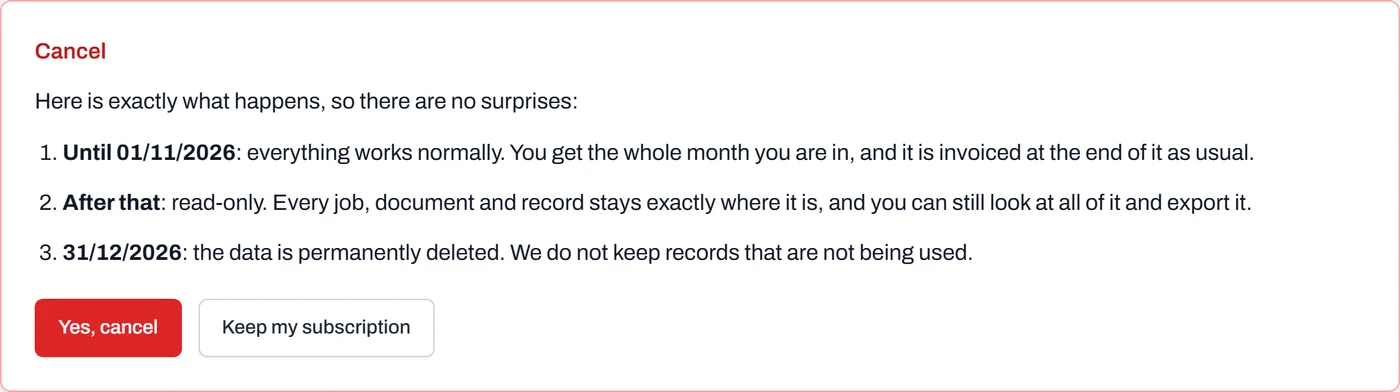
The timetable, with real dates, shown before you commit. The red button hasn't been clicked yet. - Take your export first if you're leaving for good. The Export everything button on the same page keeps working right up to the deletion date: every record, every document, every submitted form, in one zip.
- Click Yes, cancel, or Keep my subscription. If you cancel, the page confirms it, nothing more is charged, and an email restates the same three dates so they're on file.
- To come back, click Reactivate. The panel now reads Cancelled, with the timetable and a Reactivate button. If you removed your card, add one first; as the page says, add a card and the account comes straight back. Everything wakes up exactly as you left it, any time before the deletion date.
Worth knowing
- Deletion is real deletion. Your uploaded files go first, then the database records, and nightly backups age out automatically, so deleted data disappears from every backup within 30 days, exactly as the privacy policy promises. After that, nobody can recover it, including us.
- A lapsed trial is gentler than a cancellation. If your 14-day trial runs out, the account just goes read-only. Nothing is deleted for 90 days, and your data waits, exportable, in case you come back.
- Non-payment never deletes anything. A failed card means reminder emails, retries, and read-only after about 14 days unpaid, but your data is never deleted while you're subscribed.
- You're warned before any deletion. Two emails, well apart, each with the date and a link to export, because deleting a company's records without telling them first isn't something we'd defend.